Systeme.io Webinar Funnel: Templates, Examples & How to Get Started
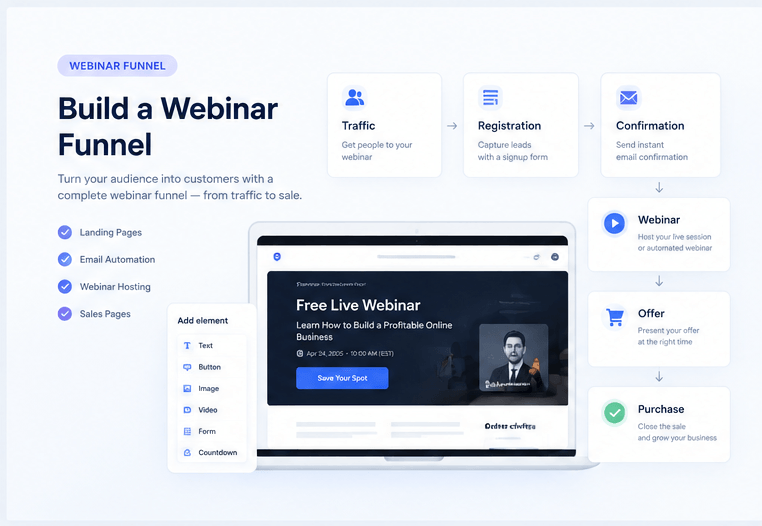
Systeme.io Webinar Funnel: Templates, Examples & How to Get Started
Want to build a Systeme.io webinar funnel without spending hours creating every page from a blank canvas?
You do not necessarily need to.
Systeme.io gives you the pieces needed to build the funnel around your webinar, and its template library can save you from designing the whole thing yourself. The bigger question is understanding what a webinar funnel actually needs, how the pieces fit together, and whether Systeme.io is the right tool for the job.
In this guide, I will break down the structure of a webinar funnel, show you what the visitor journey looks like, explain how Systeme.io fits into it, and point you toward templates so you can get started faster.
Quick answer
A Systeme.io webinar funnel is the sequence of pages, emails, webinar content, and sales steps that moves someone from first visit to registration, attendance, offer, and follow-up.
For an automated webinar, the funnel can handle much of that journey without you manually moving each person from one step to another.
Get Free Webinar Systeme.io TemplateWhat Is a Systeme.io Webinar Funnel?
Start with a simple definition.
A webinar funnel is the path someone follows before, during, and after a webinar. The webinar is only one part of the process. The funnel is everything surrounding it.
For example, someone might discover your webinar through a search result, social post, ad, email, or referral. They click through to a registration page, enter their email address, receive reminders, attend the webinar, see your offer, and then receive follow-up messages afterward.
Put another way, the webinar creates the conversation, while the funnel manages the journey around that conversation.
How Does a Webinar Funnel Work?
A good funnel should feel simple from the visitor's perspective, even though several things may be happening in the background.
Traffic brings the right people in
The first step is getting the right audience to the registration page. That could come from SEO, YouTube, email, paid advertising, social media, or another traffic source.
Your traffic source matters because a webinar about email marketing will not convert well when the people arriving have no interest in email marketing.
The registration page makes the promise
The registration page has one main job: convince the visitor that the webinar is worth their time.
It does not need to explain your entire business. It needs a clear promise, enough context to create interest, and an obvious next step.
The reminder sequence gets people to show up
Registration alone does not equal attendance.
Reminder emails help bridge the gap between someone saying "this sounds interesting" and actually turning up for the webinar.
The webinar does the selling
This is where many people misunderstand the funnel.
The registration page is not supposed to close the sale. The webinar is where you can spend more time explaining the problem, teaching something useful, demonstrating the solution, handling doubts, and introducing the offer.
The follow-up catches people who weren't ready yet
Some visitors will register and never attend. Some will watch the webinar and leave before the offer. Some will want to buy but need another day or two.
A follow-up sequence gives you another chance to communicate with those people instead of losing them after one session.
What Pages Does a Webinar Funnel Need?
You do not need twenty pages to build a useful webinar funnel. The exact setup depends on the offer, but these are the core pieces to think about.
Systeme.io Webinar Funnel Templates
This is where I think Systeme.io becomes particularly useful for someone who wants to move quickly.
You do not have to open a blank funnel and design every registration, thank-you, sales, and webinar page yourself. Systeme.io's current template library includes a dedicated Webinar category alongside other funnel categories, with ready-made pages and complete funnel structures.
The library currently describes its templates as editable pages with structure, styling, and placeholder content already in place. It also says templates can be loaded into an account with one click and then edited in the drag-and-drop editor.
Start with a template instead of a blank page
If your main goal is to get a webinar funnel online quickly, browsing the template library is probably a better starting point than designing every page from scratch.
Get Free Webinar Systeme.io TemplateThe template library is free to access. Check the current library for the latest webinar-specific templates and available categories.
What Should You Look for in a Webinar Funnel Template?
Not every pretty template is a good webinar funnel.
When choosing one, I would look at the structure first and the decoration second.
- A headline that makes the webinar's promise obvious.
- A simple registration form without unnecessary distractions.
- Space to explain what the attendee will learn.
- A clear confirmation or thank-you step.
- A dedicated place for the webinar presentation.
- A logical transition from education into the offer.
- Room for testimonials, proof, or supporting information where appropriate.
- A mobile-friendly layout.
You can change the colours, copy, images, sections, and other page elements later. It is much easier to customize a good structure than to fix a funnel that was wrong from the beginning.
How to Build a Systeme.io Webinar Funnel
You can build the funnel manually, but starting from a template can reduce the amount of design work involved.
Step 1: Decide what the webinar is supposed to sell
Before touching the funnel builder, decide what happens after the webinar.
Are you selling a course? A coaching program? A service? A digital product? An application call?
This decision affects the webinar promise, the registration page, the presentation, and the call to action.
Step 2: Build the registration page
Give people a reason to register. Explain the problem you will help them solve, what they can expect to learn, and who the webinar is for.
Keep the main action obvious. The visitor should not need to hunt for the registration button.
Step 3: Set up the confirmation experience
After registration, tell the person what happens next.
This is also a good place to reinforce the value of attending and make the next action obvious.
Step 4: Prepare the email reminders
The exact sequence depends on your schedule, but the principle is straightforward: register, remind, deliver, and follow up.
For evergreen webinars, this automation becomes especially important because the process needs to work repeatedly rather than just for one live event.
Step 5: Add the webinar presentation
This is where your actual webinar content comes in.
The software can organize the delivery and funnel around the presentation, but it cannot create a persuasive webinar for you. The content still has to teach something useful and give the viewer a reason to continue.
Step 6: Connect the offer
Decide exactly what you want the viewer to do after the presentation.
A webinar can lead into a sales page, purchase page, booking page, application, or another appropriate next step.
Step 7: Test the entire journey
This is the boring step that is easy to skip and expensive to skip.
Register yourself. Check the confirmation. Check the email sequence. Open the webinar page on desktop and mobile. Click the CTA. Make sure links work. Then go through the funnel again as if you were a real visitor.
Do not test only the pages. Test the entire journey. A beautiful registration page does not help if the confirmation email is broken or the final CTA sends people to the wrong place.
What Makes the Webinar Itself Convert?
This is the part I would keep separate from the funnel-building discussion.
A funnel can get someone registered. It cannot make a weak webinar persuasive.
The presentation needs a logical progression. In simple terms, you need to understand the audience's problem, explain why the problem exists, teach something genuinely useful, build confidence in the solution, and then make the next step feel natural.
This is one reason I would not spend all your time learning the technical side of the funnel while ignoring the presentation itself.
Want to work on the webinar itself?
If you already understand the funnel mechanics but want help with the actual webinar presentation and sales framework, take a look at Perfect Webinar Secrets.
The offer focuses on a reusable webinar framework and script, which makes it a different solution from a funnel template.
Watch Perfect Webinar SecretsLive Webinar Funnel vs. Evergreen Webinar Funnel
This distinction matters before you start building.
Live webinar funnel
You run the presentation at a specific time and interact with attendees in real time.
- Useful for live Q&A.
- Good for workshops and interactive events.
- Creates a specific event people can attend.
Evergreen webinar funnel
The presentation is recorded in advance and delivered through an automated schedule.
- Useful for recurring sales funnels.
- Does not require you to present every session.
- Works well when the webinar is part of an evergreen offer.
Systeme.io's current native webinar functionality is centered on the automated/evergreen model. The official help documentation says the automated webinar feature requires a Webinar or Unlimited plan.
What Features Matter in a Systeme.io Webinar Funnel?
When evaluating the platform, I would focus less on how many buttons exist in the dashboard and more on whether the important parts of the customer journey can work together.
What Does a Systeme.io Webinar Funnel Cost?
You do not have to start with the highest plan simply because you are interested in webinars.
Systeme.io's current pricing page lists the Free plan at $0 per month, Startup at $17 per month, Webinar at $47 per month, and Unlimited at $97 per month. The dedicated automated webinar feature is included with the Webinar and Unlimited plans.
That means the decision is less about finding the cheapest possible funnel and more about deciding whether you actually need the webinar functionality.
If you only need basic funnels and email marketing, the lower plans may be enough. If the webinar itself is central to your sales process, the Webinar plan is the first tier specifically built around that use case.
Because software pricing and limits can change, check the current Systeme.io pricing page before purchasing.
Ready to build the funnel?
Start with a ready-made template rather than designing your webinar funnel from scratch.
Get Free Webinar Systeme.io TemplateCommon Webinar Funnel Mistakes
The fastest way to waste a lot of effort is to build a technically complete funnel that nobody wants to enter or finish.
Making the registration page too complicated
More copy is not automatically more convincing. The visitor needs to understand what the webinar is about, why it matters, and what they need to do next.
Promising too much
A dramatic headline might generate registrations, but if the webinar does not deliver what the headline promised, trust disappears quickly.
Ignoring the offer until the end
The offer should influence the structure of your webinar from the beginning. You should know where the presentation is taking the viewer.
Skipping follow-up
Someone who leaves the webinar without buying is not necessarily a lost customer. They may simply need more information.
Forgetting mobile users
Registration pages, confirmation pages, buttons, forms, and webinar pages should all be tested on a phone. A funnel that works beautifully on a desktop can still lose conversions on mobile.
Is a Systeme.io Webinar Funnel Worth It?
For the right use case, yes.
The biggest advantage is not that Systeme.io magically makes webinars convert. It is that you can connect the funnel around the webinar without needing to design every piece from scratch or maintain a completely disconnected stack of tools.
The template library makes the starting point even easier. You can choose a structure that is already close to what you need, replace the placeholder content, and then adapt the pages to your own webinar and offer.
The main limitation is equally straightforward: if you specifically need a sophisticated live webinar environment with advanced real-time interaction, you may need specialized webinar software instead.
Final Verdict
A Systeme.io webinar funnel is best thought of as a complete customer journey rather than a single webinar page.
The basic path is:
Traffic → Registration → Confirmation → Reminders → Webinar → Offer → Follow-up
Systeme.io can handle the funnel side of that process, and its template library gives you a much faster starting point than building every page from a blank canvas.
But there are two different jobs here. Systeme.io helps you build and manage the funnel. Your webinar still needs a strong presentation that can hold attention and move people toward the offer.
That's why I'd start with a template for the funnel and spend your creative energy on the webinar message, presentation, and offer.
Get Free Webinar Systeme.io Template Watch Perfect Webinar SecretsDisclosure: This article contains affiliate links. If you purchase through one of the links on this page, I may receive a commission at no additional cost to you.
Dream Customer Waves
Practical systems for building, marketing and selling online.
Explore
Start Here
Guides
Tools
About
Popular Topics
Funnels
Webinars
Some links on Dream Customer Waves are affiliate links. If you purchase a product or service through one of these links,
I may earn a commission at no additional cost to you.
My goal is to provide useful information that helps you make an informed decision, whether or not you purchase through an affiliate link.
Copyright © | 2027 | Dream Customer Waves
Affiliate Disclosure • Terms of service • Contact • Privacy Policy