GoHighLevel Email Marketing: Templates, Automation & Pricing (2026)
GoHighLevel Email Marketing: Templates, Campaigns & Automation
Want to send newsletters, nurture leads, follow up after appointments, and turn more prospects into customers without managing a separate email platform? GoHighLevel combines email marketing with contact management, sales pipelines, landing pages, and workflow automation.
That combination is especially useful for marketing agencies, service businesses, consultants, coaches, and anyone who needs email to work alongside a CRM.
Explore GoHighLevel Browse Email TemplatesAffiliate disclosure: This page contains affiliate links. We may earn a commission if you sign up through them, at no additional cost to you.
What Is GoHighLevel Email Marketing?
GoHighLevel, also called HighLevel, is an all-in-one sales and marketing platform with email campaigns and automated email messages built into its CRM. You can design emails, choose recipients, schedule broadcasts, and create workflows that send messages when a contact takes a particular action.
For example, someone might complete a form on your website. GoHighLevel can add that person to your contacts, apply a tag, and start a welcome sequence. If the person books a call, another workflow can send confirmation details and reminders. Your sales team can also see the contact's activity alongside other customer information.
The main benefit is the connection between email and the rest of your marketing system. Instead of treating every subscriber as an email address in a separate tool, you can use contact details, tags, appointments, and pipeline stages to make messages more relevant.
Read our broader GoHighLevel review if you want to understand the platform beyond email, or explore its main features.
What Can You Do With GoHighLevel Email?
One-time campaigns
Send newsletters, product announcements, promotions, event invitations, and updates to a selected audience.
Automated sequences
Welcome new subscribers, follow up with leads, remind people about appointments, and nurture prospects over time.
Reusable templates
Save branded layouts and reuse them instead of rebuilding every campaign from scratch.
Contact segmentation
Organize contacts using tags, smart lists, and other available contact data so messages fit the audience.
CRM-connected follow-up
Use form submissions, appointments, and sales pipeline changes to guide relevant email communication.
Performance tracking
Review available campaign statistics and tracking data to identify what needs improving.
These features are most valuable when email is part of a larger customer journey. If you only send a simple newsletter once a month, you may not need the full CRM and automation system.
Free GoHighLevel Email Templates You Can Explore
A good template gives you a starting point for the layout, images, branding, and call to action. You can adapt the design to your business rather than starting with a blank email every time.
Below are 22 email-template examples for different industries and campaign goals. Click any image or button to visit the GoHighLevel email template library through our affiliate link. Template availability and editing options may change, so check the library for the current selection.

Interior Designer
Showcase projects, design services, portfolio highlights, and consultation offers.
View Templates
Hair Salon
Promote salon services, seasonal offers, new treatments, and appointment booking.
View Templates
Skin Care
Introduce skincare products, explain benefits, and guide readers to a product page.
View Templates
Happy Birthday
Send birthday greetings, customer appreciation messages, or a relevant special offer.
View Templates
Donut Store
Highlight new flavors, limited-time treats, store news, and local promotions.
View Templates
Personal Trainer
Promote training plans, fitness consultations, coaching packages, and client success stories.
View Templates
Event Marketing
Announce events, share the schedule, encourage registrations, and send reminders.
View Templates
HVAC Services
Promote maintenance plans, seasonal service checks, and requests for estimates.
View Templates
Black Friday
Promote sale dates, featured products, discounts, and time-sensitive shopping offers.
View Templates
Advertising
Present a service, announce a campaign, or direct subscribers to a focused landing page.
View Templates
Dermatology Product Launch
Introduce a new product, explain its intended use, and guide readers to learn more.
View Templates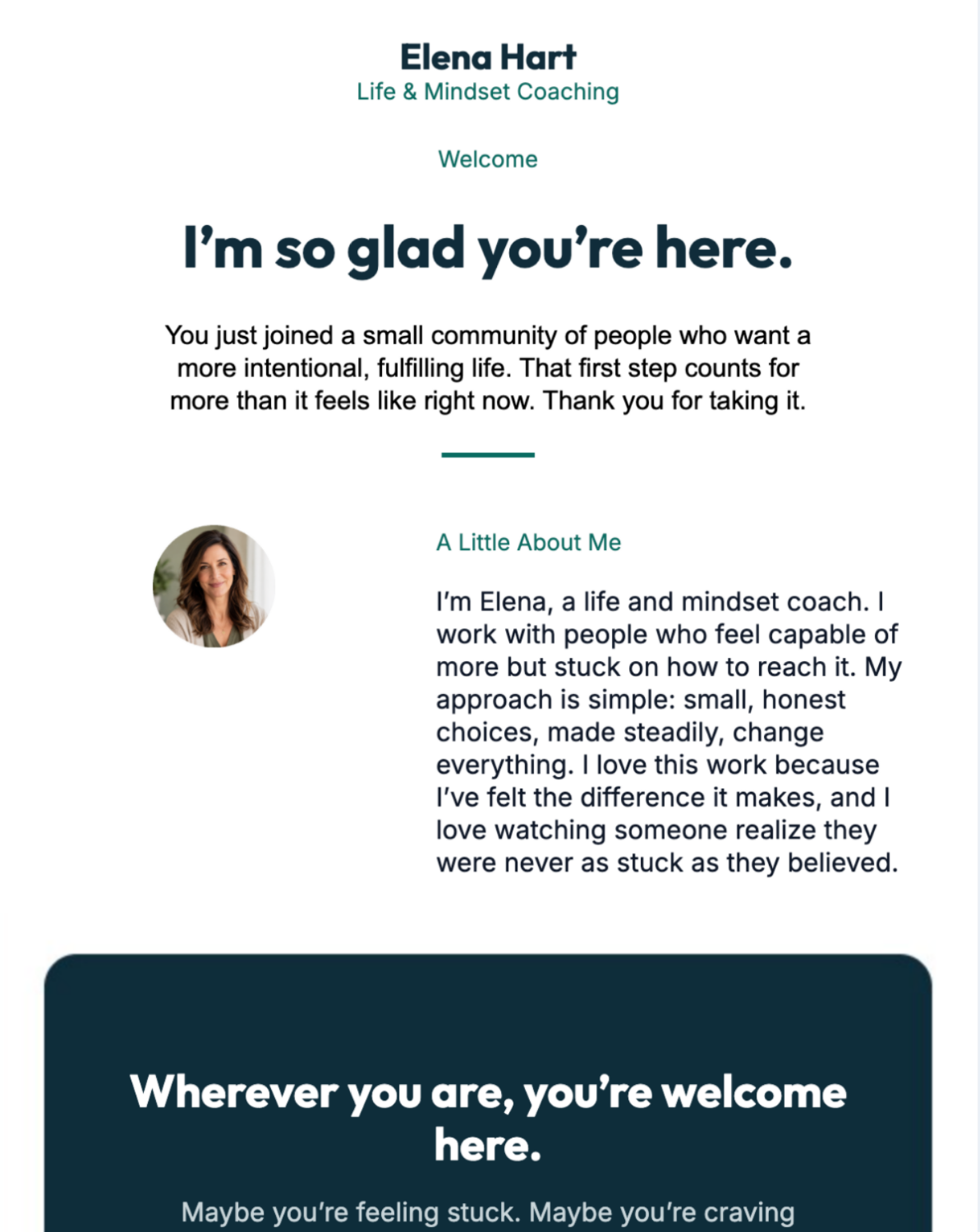
Life Coach
Share coaching insights, explain your program, and invite readers to book a discovery call.
View Templates
CRM Software
Explain software benefits, introduce a feature, or encourage prospects to book a demo.
View Templates
Cyber Monday
Feature online deals, bundle offers, and a clear route to your checkout page.
View Templates
Nutrition & Wellness
Share educational tips, promote wellness services, and introduce relevant programs.
View Templates
Accounting Firm
Explain accounting services, share tax-season reminders, and invite consultation requests.
View Templates

SaaS Campaign
Announce software features, share product updates, and encourage trials or demos.
View Templates
Radiance Beauty
Feature beauty products, explain a routine, and highlight a new collection.
View Templates
Review Request
Ask customers for feedback after a service, purchase, or completed appointment.
View Templates
Fourth of July
Plan a seasonal campaign around holiday announcements, events, or special offers.
View Templates
Web Designer Campaign
Present web design services, show project work, and invite prospects to request a quote.
View TemplatesHow to choose the right email template
- Match the goal. Choose a review request for feedback, a promotional layout for a sale, or a service-focused design for lead generation.
- Keep the main action obvious. Decide whether readers should book, reply, register, shop, or read more.
- Use your own branding. Replace sample logos, colors, text, links, and images with approved business assets.
- Check mobile layouts. Make sure the message is readable on a small screen and the CTA is easy to tap.
- Preview before sending. Test the message and links before sending to your full audience.
GoHighLevel Email Campaigns vs. Email Workflows
These two features serve different purposes. A campaign is usually a message you send to a selected group at a particular time. A workflow is a sequence of actions that runs when a defined trigger or condition is met.
| Feature | Email campaign | Email workflow |
|---|---|---|
| Primary purpose | Send a broadcast or scheduled message. | Automate messages around a contact's journey. |
| Typical example | Monthly newsletter or product announcement. | Welcome sequence after a signup. |
| Timing | Sent now or scheduled for a chosen time. | Triggered by an event, rule, or delay. |
| Personalization | Can target a chosen audience and use supported contact fields. | Can use workflow conditions and contact data to shape follow-up. |
| Best use | Announcements, newsletters, and one-time promotions. | Lead nurturing, reminders, onboarding, and repeatable follow-up. |
For a practical starting point, see the official guides on email templates vs. campaigns and sending or scheduling an email campaign.
Want Email to Work With Your CRM and Funnels?
GoHighLevel is worth exploring if you want to connect email campaigns with lead capture, contact records, appointment booking, and automated follow-up. You can test the platform before deciding whether its broader toolkit fits your business.
Explore GoHighLevel Check Current PricingHow to Set Up Email Marketing in GoHighLevel
You do not need to build a complicated funnel on day one. Start with a verified sending domain, a clear audience, and one useful email. Once the basics work, add automation.
Step 1: Configure your sending domain
Before sending campaigns, configure the email sending setup for your account and verify the relevant domain. Follow the DNS records and verification instructions shown in your HighLevel account. Correct setup helps establish your sending identity, but it does not guarantee inbox placement.
Use an address on a domain you control, and make sure your sender name and email address are recognizable to recipients. Follow the current account instructions rather than copying DNS settings from an unrelated account.
Step 2: Organize your contacts
Import or collect contacts responsibly, check that you have permission to email them, and organize them with useful tags or segments. For example, you might separate new leads, existing customers, booked appointments, and people interested in a particular service.
Do not treat every contact as a suitable recipient for every message. A relevant audience helps people receive useful communication and makes campaign results easier to interpret.
Step 3: Select or create an email template
Open the email template area, browse the available designs, and choose a starting point that fits the campaign. Edit the subject line, copy, images, branding, and CTA. Save a reusable version if you expect to send similar messages later.
Use the GoHighLevel email templates page to explore designs, then adapt the chosen layout to your own audience and offer.
Step 4: Build and review your campaign
Choose the right audience, write a clear subject line, and give the email one primary purpose. If the goal is to book a consultation, make that action clear instead of filling the message with unrelated links.
- Check the sender name and sender email.
- Confirm the recipient list or segment.
- Check links, buttons, images, and personalization fields.
- Preview the design on desktop and mobile.
- Send a test email before the full campaign.
- Schedule the send or send it when you are ready.
Step 5: Create your first automated sequence
After your first campaign is working, create a simple workflow around one clear trigger. A new lead submitting a form is a useful starting example.
Example: A five-email welcome sequence
- Email 1: Welcome. Deliver the promised resource or explain what the subscriber can expect.
- Email 2: Help. Address a common question or mistake your audience faces.
- Email 3: Teach. Share a useful guide, demonstration, or practical tip.
- Email 4: Explain your offer. Show who the product or service helps and what problem it addresses.
- Email 5: Invite action. Encourage the subscriber to book a call, try a product, or visit a relevant page.
Set sensible delays between messages and stop promotional follow-ups when the contact no longer qualifies for them. Use workflow conditions where appropriate so people do not continue receiving messages that no longer fit their situation.
For more on the systems around your email sequence, explore GoHighLevel Workflow AI, lead management, and the funnel builder.
GoHighLevel Email Marketing Pricing: What Should You Budget For?
GoHighLevel's main subscription plans have commonly been listed at $97 per month for Starter, $297 per month for Unlimited, and $497 per month for Agency Pro. Check the official pricing page before buying because plan details and promotional offers can change.
Do not assume the platform subscription covers every email delivery cost. HighLevel's LC Email service has separate usage-based pricing. The current support documentation lists email sending at $0.675 per 1,000 emails; verify the rate and any applicable account-specific conditions before calculating your budget.
| Cost item | What to check |
|---|---|
| Platform subscription | Which plan fits your business, sub-account needs, and agency setup? |
| Email sending | Current LC Email rate, sending volume, and any account-specific limits. |
| Domain and DNS | Whether you already own a domain and can configure the required records. |
| Other usage | Separate charges for phone, SMS, AI features, or other services you choose to use. |
| Setup time | Time needed to build templates, clean contacts, test workflows, and review results. |
For a single business, the Starter plan may be enough if you also want the CRM, funnels, and automation features. Agencies managing multiple client accounts may need to compare the higher tiers. Do not upgrade just for email unless the additional plan features solve a real need.
Review the GoHighLevel pricing guide and the official LC Email explanation and pricing details before estimating your total cost.
View Official PricingHow to Improve Email Deliverability
Choosing an email platform is only one part of reaching the inbox. Deliverability also depends on your sending practices, domain configuration, audience quality, and how recipients respond to your messages. No platform can guarantee that every email will reach the inbox.
- Use a domain you control. Complete the current sender-domain verification steps.
- Send to people who expect your messages. Use appropriate opt-in methods and avoid purchased or scraped lists.
- Keep your list healthy. Remove invalid addresses and pay attention to repeated bounces and complaints.
- Make the content relevant. Match the message to the subscriber's interests and the reason they joined your list.
- Use a recognizable sender. Keep your business identity and reply address clear.
- Make unsubscribing straightforward. Respect opt-outs and applicable email marketing laws.
- Increase volume carefully. Follow the platform's current sending limits and ramp-up guidance instead of immediately sending a large campaign from a new setup.
- Monitor results. Review bounces, complaints, clicks, and conversions. Treat open rates cautiously because privacy features can affect how opens are measured.
For additional guidance, use the current GoHighLevel support portal and the email sending limits and ramp-up guidance available for your account.
GoHighLevel Email Marketing: Pros and Cons
What works well
- Email can work alongside CRM records and sales pipelines.
- Templates help speed up repeat campaigns.
- Workflows support automated follow-up.
- Forms, funnels, calendars, and contact management can share the same system.
- Agencies can manage client accounts in one platform.
What to consider
- The full platform may be expensive if you only need basic newsletters.
- Email delivery usage can be charged separately from the subscription.
- Domain setup and workflow design require some learning.
- Deliverability still depends on your list and sending practices.
- Feature availability and interface details can change.
The biggest question is whether you will use the connected marketing features. If your business needs lead capture, appointments, sales follow-up, and CRM records as well as email, GoHighLevel can be worth evaluating. If email is your only requirement, compare it with a dedicated email marketing service before committing.
GoHighLevel vs. Standalone Email Marketing Tools
Standalone email tools often focus on newsletters, audience management, campaign design, and email automation. GoHighLevel's main distinction is its broader combination of CRM, funnel building, calendars, and multi-step workflows.
| Your situation | What to evaluate |
|---|---|
| You mainly send newsletters | Compare the cost and simplicity of a dedicated email service. |
| You sell services and book appointments | Look at the value of connecting email, calendars, CRM records, and reminders. |
| You run an agency | Compare sub-account management, automation, reporting, and client delivery needs. |
| You run an online store | Check the integrations and ecommerce event data you need for customer campaigns. |
| You need complex email-only automation | Test whether the workflow logic, segmentation, reporting, and email-specific features meet your requirements. |
There is no universal winner. Your audience size, sending volume, integrations, automation requirements, and budget matter more than the number of features on a comparison chart.
Explore the wider GoHighLevel review or compare specific tools in our GoHighLevel features guide before choosing.
Build a Connected Email Marketing System
Start with one campaign, one useful template, and one simple workflow. If you need more than email, GoHighLevel lets you explore how those messages can connect to landing pages, contact records, and follow-up.
Explore GoHighLevel Browse Email TemplatesFrequently Asked Questions
Does GoHighLevel have email marketing?
Yes. GoHighLevel supports email campaigns, reusable templates, contact targeting, scheduling, and workflow-based email automation. It also connects email with its CRM and other marketing tools.
Does GoHighLevel offer free email templates?
GoHighLevel provides an email template library that you can explore. Availability may change, and access to the platform itself is subject to its subscription and trial terms. Visit the email template library to see the current options.
Can GoHighLevel send automated email sequences?
Yes. Workflows can send emails when configured triggers and conditions are met. You can use them for welcome messages, lead nurturing, appointment reminders, and other repeatable communication.
What is the difference between an email template and an email campaign?
A template is a reusable layout. A campaign is the message you customize and send to a selected audience. You can reuse a template to create different campaigns.
How much does GoHighLevel email marketing cost?
The platform subscription is separate from certain usage-based services. Check the current GoHighLevel pricing page and the current LC Email rates to estimate the total cost for your sending volume.
Do I need to connect a separate email provider?
HighLevel offers LC Email as a built-in email service, so a separate third-party provider may not be necessary for standard email sending. Check the current documentation and your account setup for the requirements that apply to your use case.
Can GoHighLevel guarantee that emails reach the inbox?
No. Domain configuration, list quality, recipient engagement, authentication, message content, and sending behavior all affect deliverability. Proper setup can help, but inbox placement is never guaranteed.
Is GoHighLevel a good choice for a small business?
It can be a good fit if you need email marketing alongside a CRM, appointment booking, landing pages, and automated follow-up. If you only need basic newsletters, compare the total cost and complexity with a dedicated email platform.
Can I test emails before sending them to customers?
Yes. Use the available preview and test-email options to review the design, links, and content before sending or scheduling a campaign.
Can I use GoHighLevel email templates for my own business?
You can customize available templates within the platform according to the applicable account and template terms. Replace example content with your own approved branding, copy, images, and links before sending.
Final Verdict: Is GoHighLevel Email Marketing Worth It?
GoHighLevel email marketing is most compelling when you want more than a tool for sending newsletters. Its combination of campaigns, reusable templates, CRM data, and workflow automation can help you build a connected follow-up system for leads and customers.
The trade-off is that you need to learn the platform and account for email sending charges alongside the main subscription. If you will use its CRM, funnels, booking tools, and automation, that broader value may justify the cost. If you only send occasional emails, a simpler service may be enough.
Start by reviewing the template library, testing a small campaign, and building one straightforward workflow. Then decide based on your actual requirements, total costs, and campaign results.
Explore GoHighLevel See Email TemplatesPricing, template availability, and features can change. Confirm current details on GoHighLevel's official website before making a purchase. This article is informational and does not guarantee marketing results.
